Showing posts with label Android. Show all posts

Cara Mengatur Do Not Disturb Pada Ponsel Google Pixel

 Setelah sekian lama baweh online tidak mengupdate content pada blog baweh belajar menulis online, pada kesempatan ini ingin menulis tentang bagaimana cara mengaktifkan fitur do not disturb terutama pada Sobat yang menggunakan Google Pixel.

 Mungkin sobat sering terganggu dengan notifikasi dari Android, tetai tidaklah harus begitu. Mengaktifkan mode "Do Not Disturb" adalah salah satu cara yang bisa sobat gunakan untuk membungkam pemberitahuan yang mengganggu pada saat sobat tidak membutuhkannya. Berikut adalah cara menyiapkannya pada ponsel Google Pixel.

Sebagian besar perangkat Android dan termasuk termasuk ponsel Google Pixel menyertakan beberapa pengaturan "Do Not Disturb". Ada banyak hal yang bisa sobat lakukan melalui fitur pengaturan ini dan meluangkan waktu untuk menyesuaikannya dapat meningkatkan pengalaman sobat menggunakan posel Google Pixel tersebut.

Bagaimana cara menyesuaikan pengaturan fitur "Do Not Disturb" pada ponsel Google Pixel ?

Pengaturan "Do Not Disturb" dapat sobat temukan pada pengaturan suara. Pertama, geser ke bawah dari atas layar dua kali, lalu ketuk ikon roda gigi untuk membuka menu pengaturan.

Buka Suara (atau Suara & Getaran) kemudian pilih "Do Not Disturb".

Pada bagian tersebut Sobat dapat memutuskan orang dan aplikasi mana saja yang dapat memberikan notifikasi walau Sobat telah mengaktifkan mode  "Do Not Disturb". 

Ketuk "Panggilan" untuk memilih orang mana yang dapat menelpon Sobat walau dalam mode  "Do Not Disturb". Selain orang yang Sobat pilih maka tidak dapat mengganggu ketika dalam mode  "Do Not Disturb".

Sobat dapat memilih salah satu opsi berikut, Pertama Kontak berbintang : Siapa saja yang sobat simpan sebagai kotak berbintang. Kedua Kontak : Siapa saja yang kontaknya sobat simpan dapat melakukan panggilan walau dalam mode  "Do Not Disturb". Ketiga Siapa Saja :  Siapa saja tetap bisa memanggil walaupun dalam mode  "Do Not Disturb". Keempat : Tidak Ada : Apabila opsi ini yang sobat pilih, maka tidak ada yagn dapat menghubungi sobat baweh online.

Jika Sobat memilih "Starred Contacts" /Kontak berbintang, sobat daapt mengetuk ikon roda gigi untuk menambahkan atau menghapus orang.Pilih ikon di pojok kanan atas untuk menambahkan kontak berbintang (yang ada gambar seperti orang)  dan atau mengetuk ikon bintang untuk menghapus seseorang dari kontak berbintang. Ketik panah kembali setelah selesai mengatur kontak yang dapat melakukan panggilan dalam mode "Do Not Disturb".

TAhap selanjutnya aktifkan toogle untuk "Izinkan penelepon berulang" jika sobat ingin seseorang dapat menyambung saat mereka menelepon untuk kedua kalinya dalam waktu 15 menit. Ketuk panah kembali setelah selesai pengaturan  "Do Not Disturb".

Selanjutnya kita akan meneruskan memanfaatkan mode  "Do Not Disturb" untuk :"Pesan". Pada pengaturan pesan saat mode  "Do Not Disturb" sama seperti pengaturan pada panggilan. Jika Sobat memilih "Starred Contacts". Sobat dapat menyesuaikan lagi kontak berbintang dengan mengetuk ikon roda gigi. Ketuk pada kembali setelah selesai.

Hal yang harus disiapkan pada bagian orang adalah soal "Percaakapan". Mulai di Android 11, Sobat dapat menyorot percakapan tertentu di aplikasi perpesanan. Dalam konteks mode  "Do Not Disturb"., mungkin Sobat tidak ingin diberitahu dika teman menghubungi Sobat di Facebook Messenger, tetapi sobat ingin tahu apakah mereka mengirim sobat SMS yang mendesar.

Terdapat tida opsi dalam percakapan (Conversations). Pertama Semua Percakapan : Setiap percakapan yang sobat pindahkan ke bagian percakan di notifikasi. Kedua Percakapan Prioritas : Percakapan yang sobat tandai sebagai prioritas. Ketiga Tidak Ada :  "Do Not Disturb" Abaikan semua percakapan.

Langkah selanjutnya setelah mengatur Panggilan dan Pesan adalah menyesuaikan pemberitahuan lain mana yang dapat diizinkan selama mode  "Do Not Disturb". Pilih alarm & Gangguan Lainnya.

Sobat akan melihat daftar jenis notifikasi dengan toogle di sebelahnya yang dapat sobat aktifkan /matikan. Piliha salah satu yang ingin Sobat lihat selama mode  "Do Not Disturb".

Bagian terakhir yang dibahas soal mode  "Do Not Disturb" adalah aplikasi. Ini menunjukkan aplikasi mana saja yang dapat memperingatkan sobat selama mode  "Do Not Disturb".Aplikasi yang dapat mengirimkan notifikasi walau dalam ode  "Do Not Disturb" ada pada bagian atas. Perhatikan bahwa mereka mungkin mengatkan beberapa pemberitahuan. Sobat daapt memilih aplikasi untuk menyesuaikan dengan tepat pemberitahuan mana yang boleh mengganggu saat mode  "Do Not Disturb".

Untuk dapat menambahkan lebih banyak aplikasi ke daftar ini ketuk "Add Apps". Setelah sobat klik akan diperluas dengan daftar lengkap aplikasi yang terinstal pada ponsel Google Pixel Sobat. Silahkan pilih notifikasi dari aplikasi saat mode  "Do Not Disturb".

Sobat akan diarahkan ke halaman dengan semua jenis pemberitahuan yang bisa datang dari aplikasi. Alihkan mode toogle untuk mengaktifkan dan menonaktifkannya selama mode  "Do Not Disturb".

Setelah selesai mengatur mode  "Do Not Disturb" Sobat dapat kembali ke pengaturan utama,  "Do Not Disturb". Hal berikutnya yang dapat Sobat lakukan adalah memilih berapa lama mode  "Do Not Disturb" akan berjalan dari pengaturan cepat ponsel android pixel yang sobat miliki.

Untuk hal tersebut iatas Sobat dapat memilih untuk tetap mengaktifkan mode  "Do Not Disturb" sampai sobat mematikannya sendiri. Kedua menyetel durasi waktu khusus atau bertanya setiap saat dan ketuk OK setelah sobat selesai mengatursemuannya.

 Langkah selanjutnya cara mengatur mode "Do Not Disturb"pada ponsel Google Pixel dan bisa dicoba untuk pengaturan ponsel android dari pabrikan lain dan ditunggu komentarnya. Tahap selanjutnya yaitu pemilihan "Opsi Tampilan Untuk Notifikasi Tersembunyi", ini akan menentukan notifikasi apa yang diblokir selama mode "Do Not Disturb" terlihat dan terdengar.

Pada bagian ini terdapat tiga pilihan. Pertama Tidak ada suara dari pemberitahuan : pada pilihan "Do Not Disturb" ini pemberitahuan tetap akan muncul namun tidak akan bersuara. Kedua Tidak ada visual/Suara dari pemberitahuan : Sobat tidak akan melihat/mendengar pemberitahuan. Ketiga Kustom : Pilih langkah ini untuk membuat pilihan sobat secara spesifik tentang bagaimana pemberitahuan muncul saat mode "Do Not Disturb".

Apabila sobat memilih kustom ketuk ikon roda gigi untuk menampilkan opsi pilihan. Sobat dapat memilih beberapa variabel berbeda untuk menentukan dengan tepat bagaimana pemberitahuan akan muncul dalam situasi yang berbeda.

Dan pengaturan  "Do Not Disturb" Pada Ponsel Pixel yang terakhir yaitu mengatur jadwal mode  "Do Not Disturb". Tap "Jadwal" Sobat akan melihat beberapa jadwal prasetel yang dapat sobat gunakan. Apabila sobat telah membuat jadwal mode waktu tidur di ponsel, maka mode tersebut akan munncul dan sobat dapat memanfaatkannya.

Untuk membuat jadwal khusus, Sobat dapat mengetuk "Add more" di bagian bawah, Sobat akan diminta untuk memilih jenis jadwal terlebih dahulu. "Schedule" akan menjalankan mode  "Do Not Disturb" berdasarkan acara kalender. "Time" akan menjalakan mode  "Do Not Disturb" pada waktu tertentu.

Setelah selesai semua proses pengaturan  "Do Not Disturb", Sobat dapat mengaktifkannya kapan saja diantara cara mengaktifkan mode  "Do Not Disturb" dengan pergi ke pengaturan>Suara>Do Not Disturb dan ketuk tomol "Turn On Now". Selamat Mode Jangan Ganggu pada Ponsel Google Pixel sedang berjalan.

Apa Itu Aplikasi KODI ?

Bingung mencari media player yang free dan open source yang bisa Anda gunakan untuk mendengarkan musik, radio, menonton TV, menonton koleksi langganan visual digital dimanapun Anda Berada ?

Apabila Anda menginginkan untuk menikmati conten digital dimanapun kalian berada jangan lupa untuk menginstall aplikasi kodi pada sistem operasi yang Anda gunakan saat ini. Lalu apa aplikasi kodi tersebut ?

Apa Itu Google Fuchsia ?

Mungkin saja teman-teman baweh belajar menulis online akhir-akhir ini sering mendengar istilah baru yang berkaitan dengan mesin pencari Google yaitu istilah Google Fuchsia. Apa itu Google Fuchsia ?

Tawaran Bug Bounty One Day Exploit Hingga $1.5M

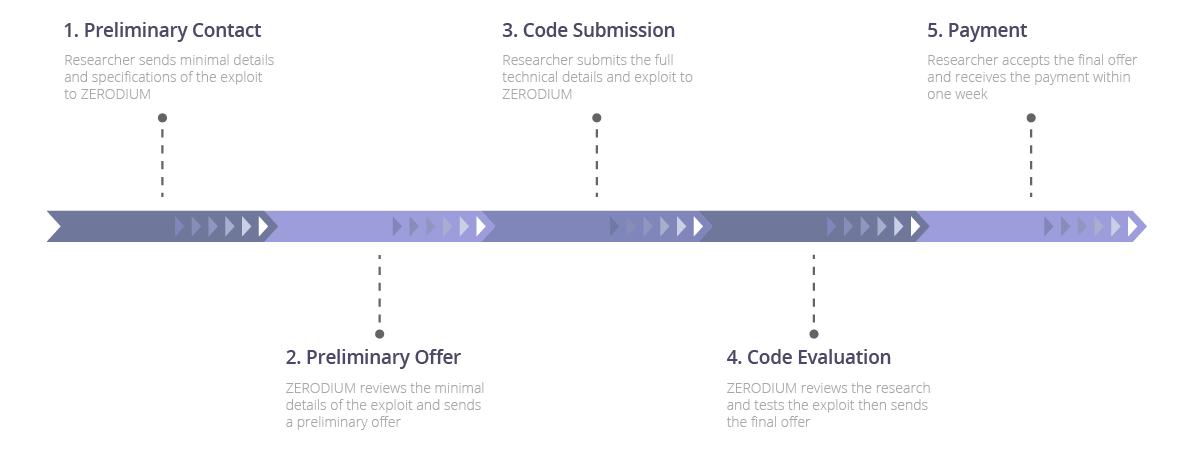
Gambar : Zerodium
Hai Baweh online ga salah tulis itu bayaran bug bounty One-Day Exploit hingga $1.5M ?. Tidak, saya tidak salah ketik tentang besarnya hadiah yang bisa kalian bawa pulang apabila berhasil mengeksploitasi sistem operasi iOS 10. Program bug bounty one-day-exploit ini diselenggarakan oleh perusahaan informasi keamanan amerika yaitu Zerodium.

Zerodium menawarkan bayaran hingga $1.5M bagi exploitasi orisinil dan kerentanan yang belum pernah dilaporkan sebelumnya dengan memberitahukan secara detail terhadap sistem operasi, software dan atau perangkat.

Didirikan pada tahun 2015 lalu, bisnis utama perusahaan Zerodium berfokus pada perolehan kerentanan zero-day dan eksploitasi dan menciptakan langkah-langkah keamanan pelindung dan rekomendasi untuk mereka. Informasi pada kerentanan dan langkah-langkah perlindungan yang sesuai kemudian akan dilaporkan ke klien zerodium, yang sebagian besar perusahaan-perusahaan multi-nasional dalam sektor teknologi, keuangan dan pertahanan.

Zerp-Day exploit program yang bisa diajukan ke Zerodium untuk diakuisisi dan diberi imbalan dari Zerodium mencakup apa pun dari phpBB sampai iOS dengan berbagai tingkat pembayaran.

Zero-Day Exploit pada Windows, MacOS, dan Linux yang dapat menerima hingga $30.000. Exploitasi untuk Android hingga $200.000.

Pelaporan One-Day Exploit untuk browser seperti Chrome, Internet Explorer, Edge dan Safari dapat memperoleh bayaran hingga $80.000.

Setiap akuisisi yang diterima dan disetujui Zerodium dibayarkan secara langsung lewat transfer Bank. Zerodium juga bisa menambahkan bonus tambahan dalam kurun waktu tertentu apabila exploitasi One-Day tersebut layak mendapatkan bonux.

Zerodium melaporkan bahwa dalam kurun waktu 12 bulan terakhir telah menghabiskan dana $6.5 M untuk membayar mereka yang berhasil mengeksploitasi keamanan dan kerentanan sistem operasi, software dan device. Bayaran paling banyak untuk pembayaran iOS dan Android. Bagaimana cara mengikuti bug bounty Zerodium tersebut ?

Hasil Pembaruan Facebook Live Android

Setelah update layanan facebook messenger, whatsApp, Instagram. Aplikasi Facebook yang mendapatkan giliran update selanjutnya yaitu Facebook Live. Mashable sebagai situs yang konsen terhadap media sosial mendapatkan update terbaru Facebook Live. Versi terbaru facebook live memperlihatkan tampilan user interface yang lebih menonjolkan fitur livestreaming.

Sebuah tab baru bisa langsung mengakses facebook live yang ditempatkan di bagian atas, pada bagian antara tab friend request dan notifikations. Tab baru facebook tersebut menyediakan tempat khusus yang mana pengguna facebook live bisa mengakses berbagai macam live video yang ada. Daftar channel facebook live diurutkan seperti layaknya postingan facebook.

Daftar live video facebook disusun berdasarkan preferensi pengguna facebook, sehingga kemungkinan untuk ditonton oleh pengguna lebih besar. Selain berdasarkan preferensi pengguna, pengurutan daftar live video juga berdasarkan tingkat popularitas video saat ini.

Ketika mengklik sebuah live video facebook, pengguna juga bisa berkomentar secara langsung, komentar-komentar dari pengguna lain juga ditampilkan ketika livestreaming facebook sedang berjalan.

Untuk lebih memanjakan pengguna facebook dalam menikmati tontonan video, Facebook Live juga merubah antar muka menu dan bar pencarian menjadi hitam.

Menu "Guide" pada pojok kanan aplikasi facebook live bakal membuka sederetan topik video yang tersedia saat ini, mencakup video kategori world news, politics, Health and Fitness, Food dan lain-lain.

Topik-topik dalam facebook live tersebut juga bisa dipilih dan di custome oleh pengguna facebook live untuk mendapatkan prioritas dalam menonton berbagai macam kategori video yang ingin ditonton.

Singkatnya, Facebook Live akan memegang peranan sentral dalam update aplikasi facebook selanjutnya, Sayangnya hingga 09/05/2016 pengguna facebook indonesia belum bisa menikmati layanan terbaru facebook live tersebut. Kita tunggu sama-sama ya teman untuk bisa melihat update terbaru facebook live tersebut.


Sumber : Kompas Tekno

Twitter Mengganti Bintang Dengan Hati

Kalau belum sempat membuka Twitter sampai hari ini, maka jangan heran kalau tidak ada lagi menu favorit dan mendapati menu like dengan ikon hati di Twitter, karena memang sejak tanggal 03/11/2015 kemaren Twitter mengumumkan perubahan tersebut.

Penggantian ikon bintang dengan logo hati tersebut diharapkan memudahkan bagi pengguna Twitter, khususnya bagi pengguna twitter baru. Penggunaan ikon bintang membingungkan bagi sebagian orang, terutama pengguna Twitter baru. Dengan alasan tersebut Twitter merubah ikon favoritnya menjadi ikon hati.

Cara Disable Autoplay Video Facebook Dan Twitter

Bagi pengguna interneta yang berlangganan internet tanpa batas tentu hal ini menguntungkan karena mereka tidak perlu klak klik untuk menonton video di Facebook dan Twitter. Namun bagi pengguna yang mendapatkan kuota terbatas tentu fasilitas disable autoplay video facebook dan twitter sangat berguna bagi mereka. Pada kesempatan ini baweh online akan berbagi cara disable autoplay video di facebook dan twitter untuk android, iOS dan Desktop.

Cara Disable autoplay video facebook dan twitter untuk Android
Cara menonaktifkan auoplay video di facebook dan twitter untuk Android pengguna harus masuk ke menu 'settings' ->video play automatically'-> munculah opsi untuk menonaktifkan autoplay video atau tidak. Karena kita hendak menonaktifkan fitur autoplay video maka pilihlah untuk menonaktifkannya/ mengaktifkan ketika berada di jaringan WiFi. Berikut gambarannya
Bagi pengguna twitter android juga bisa menoaktifkan autoplay video twitter di android dengan cara mengakses 'settings' pilih 'general' lalu pilih 'video autoplay'. Pilih 'off' atau 'wifi only'


Cara disable autoplay video facebook dan twitter untuk pengguna iOS
Cara menonaktifkan fitur autoplay video di iOS yaitu dengan cara membuka aplikasi facebook untuk iOS, lalu pilih 'settings', lalu pilih 'Account settings'. Maka akn muncul pilihan 'videos and Photos' lalu pilih menu 'auto-play'.

Dari autoplay video and photo iOS, pengguna bisa menonaktifkan fitur tersebut dengan berbagai pilihan seperti smart auto-play, use cellular data and wifi, use wi-fi only, dan never play videos automatically.

Bagi pengguna aplikasi twitter untuk iOS dapat menonaktifkan autoplay video twitter dengan cara mengakses fitur 'settings'->Accounts->Video Autoplay. Maka akan keluar berbagai opsi untuk mengakses/menonaktifkan autoplay video twitter seperti facebook diatas.

Cara disable autoplay video untuk desktop
Bagi pengguna yang mengakses Facebook dan Twitter lewat desktop dapat menonaktifkan video autoplay Facebook dan Twitter dengan mengikuti langkah-langkah menonaktifkan video autoplay untuk desktop sebagai berikut;

Bagi pengguna Facebook silahkan buka situs Facebook, lalu memonaktifkan autoplay video facebook dari menu 'settings' setelah itu pilih 'videos' dan pilih 'off' di menu autoplay videos.

Sedang sobat yang mengakses twitter dari desktop dapat menonaktifkan autoplay video dengan cara buka situs twitter, lalu masuk ke menu 'settings' lalu pilih 'videos' dan pilih 'off' di menu autoplay videos.
Itulah sob cara disable autoplay video facebook dan twitter baik ketika diakses menggunakan smartphone Android, iOS, dan desktop.

Sumber : Liputan6

Cara Mengatur Akun Google Terbaru

Ketika kita bersinggungan dan berinteraksi di dunia maya kita akan memikirkan bagaimana keamanan informasi yang kita miliki. Apakah privacy kita akan dijual kepada perusahaan periklanan ? Apakah informasi tentang kesukaan kita berselancar di dunia maya pada topik tertentu akan di jual ke pihak penyedia iklan kontekstual, sehingga mereka tahu produk yang kita sukai ? dan masih banyak ketakutan-ketakutan yang melanda sebagian pengguna internet soal keamanan informasi dan privacy mereka.

Penelitian yang dilakukan Pew Study menyatakan bahwa 93 persen manusia berfikir bahwa penting untuk memegang kendali penuh atas informasi pribadi mereka, 90 persen mereka care (memperhatikan) jenis informasi apa saja yang diminta ketika mendaftar untuk membuat akun. Namun hanya 9 persen yang merasa memiliki kontrol penuh terhadap informasi yang mereka bagikan.

Melihat hasil survey tersebut google hendak membalikkan keadaan tersebut. Mereka memiliki kontrol lebih banyak terhadap informasi yang mereka bagikan. Untuk itu google membuat halaman khusus untuk mengatur privacy dan keamanan berinternet. Bagaimana cara mengatur akun google terbaru tersebut ?

Google membuat tool yang simple, mengatur privacy yang kuat dan mencakup tentang keamanan informasi, melalui tool kontrol informasi dan privacy tersebut banyak manfaat bagi pemilik akun google.

Pada perhelatan Google I/O 2015, Google mengumumkan bahwa pengguna memiliki kontrol terhadap informasi yang mereka berikan ke aplikasi Android M nanti. Selain itu Google juga meningkatkan privacy dan keamanan penggunanya lewat tool untuk mengatur settingan Google yang dinamakan My Account dan situr baru yang berisi tanya jawab seputar privacy dan keamanan Google.

Privacy dan keamanan adalah dua hal yang selalu hangat diperbincangkan, keduanya ibarat dua sisi koin yang tidak bisa dipisahkan. Melalui tool situs my Account kalian bisa dengan cepat mengatur privacy dan keamanan informasi yang kalian miliki.

My Account Google juga membantu bagaimana harus menggunakan data yang kalian miliki, mengamankan privacy, dan membagikan informasi lebih baik. Lalu apa saja yang bisa dilakukan lewat My Account Google tersebut ? berikut penjelasan My Account Google :

Mengenal Sistem Operasi Brillo Dari Google

Google sebagai mesin pencari paling berpengaruh saat ini sedangkan mengembangkan sistem operasi Brillo untuk Android yang bisa digunakan untuk aktifitas Internet of Things.

Gambaran sederhana Internet of Things artinya mengembangkan dan menyambungkan berbagai perangkat pintar melalui media internet. Hal tersebut menjadi tren saat ini. Dan Google sebagai salah satu perusahaan teknologi terbesar tidak mau meninggalkan momen tersebut dengan meluncurkan sistem operasi Brillo. Mari mengenal sistem operasi Brillo lebih jauh lagi.

New Trojan Hijacts Android Smartphones

Baweh Online Diary Blog. A malicious malware targeted at android smartphones has appeared in china. Lookout reported that the malware codenamed "geinimi" is able to compromise personal data on user's phone and send it to remote server. Geinimi also the first malware for android in the wild that displays botnet-like capabilities, "wrote" "tim" on blog.

The software, known as a "Trojan," is currently uploaded through repackaged versions of Android apps distributed by third-party Android app market. Trojans are pieces of software that appear legitimate to the user, but often have harmful purposes. The code is designed to take control of the system to affect the chosen form of damage.

A botnet is an army of robots or systems that have been compromised without the knowledge of their owners. These computers are used to forward spams and viruses to other computers through the internet.

The Trojan can compromise users' privacy as it is primarily created to collate information related to location and unique identifying codes and then transfer it to live servers.

This isn't the first malware for the Android. In August Kaspersky Lab reported that a virus named TrojaN-SMS.Android OS.FakePlayer-A had surfaced for the OS. The virus took the form of a media player and would fire SMSes to expensive phone numbers running the user's bill through the roof. The virus had only infected devices in Russia.

The development of these viruses speaks of a shift among virus developers as they move from desktops to smartphones as the number of the devices grows.


Source: ibtimes

Top Ten Technology Trends of 2010

Baweh Online Diary Blog

Year 2010 will go from us on some day later and we will get year 2011. Baweh online diary for your guide to social networking online was share about top ten social networking resolution in 2011. If you may read here Now I will share about top 10 tech trends among 2010.
  1. The ipad and the raise of tablets
  2. When the new year dawned, almost no one in the world knew what an iPad was. Outside of the techno-geek community, few had even heard of tablet computers -- the hybrid, missing link between smartphones and laptops. Now, 13 million or so sales later, the Apple gadget is at the top of the list of gadgets that children 6 to 12 want to see under the tree this year, according to Nielsen research. And it's starting to get some company. In a field of tablets running Google's Android operating system, the Samsung Galaxy has emerged as the iPad's chief rival. Early this month, Samsung said that the tab had sold 1 million units since its launch in October. And Research In Motion, the makers of BlackBerry, plan to join the battle early next year with the Playbook, which they're already touting as being more efficient than the iPad. Tablets don't have the computing heft of slightly larger laptops or the pocket-size storage of a smartphone. But their video, gaming, Web-surfing and media-consumption abilities are capturing a big audience and it's a safe bet they're here to stay.
  3. We are facebook; resistance is futile
  4. A major Hollywood movie. A Time magazine "Person of the Year" nod for its CEO. And a half-billion users, more or less. Oh yeah ... and it passed Google to become the Web's most-visited site. If Facebook was already a force of internet nature on New Year's Day, it became a phenomenon unmatched in Web history in 2010. But personalities aside, the site itself continued to integrate itself into everyday life. E-mail continued to wane because of Facebook messaging, which included a new ramped-up system. And the way we relate to each other has probably been changed forever.
  5. Check in, Turn on and go out
  6. Growing with the rising number of smartphones, social apps such as Foursquare and Gowalla creeped out of the tiny cloister of the tech elite and into the mainstream. Foursquare, which has emerged as the leader in the field, saw dramatic growth in 2010. The concept of checking in at bars, restaurants and other spots appeals mainly to a young, social crowd, and, in the minds of some, raises privacy concerns. But a spate of apps for homebodies followed in 2010. Mobile apps such as GetGlue, Miso and Philo let users check in to TV shows, movies, books and other entertainment, earning virtual and sometimes real-word rewards along the way. Other apps offer similar rewards for visiting websites, meaning users don't have to leave their desks to play. According to Crowley, one of the goals of such apps is to turn the whole world into a game. Most Web users haven't signed on yet, but the number of those who have keeps on growing.
  7. Look, ma! No hands!
  8. The way we play video games began what could be a seismic shift in 2010. And there were no paddles or joysticks involved. Microsoft's Kinect system for the Xbox 360 took the greatest leap forward. Rolled out at the E3 video-game expo in June, the Kinect is totally hands-free, using a camera to read the player's movements and incorporate them in the game. Not to be outdone, Sony rolled out its Move system for the PlayStation 3. Utilizing remote controllers that look a bit like glowing ice-cream cones, Move isn't quite hands-free, but boasts what developers say is superior motion-sensing. And then there's Nintendo. The pioneers of motion-based gaming stood pat on the hardware this year, but pressed its early advantage by rolling out more complex, fully-imagined games such as "Metroid: Other M," "Disney: Epic Mickey" and "GoldenEye 007."
  9. Watching the web on the tv
  10. Apple TV was launched in 2007, but it mostly languished until it got a reboot and a major price cut in September. In addition to Netflix integration, the system lets users buy TV shows for 99 cents each. Google has promised a similar system -- optimizing Web sites for TV and striking deals with the likes of HBO, Pandora and Netflix. Google TV has hit some snags. Several major networks aren't playing along, and The New York Times recently reported that it needs more time than expected to work on software. Meanwhile, companies such as Roku and Boxee are offering similar devices, suggesting that Web TV, in one form or another, is here to stay.
  11. The saga of the iphone 4
  12. Oh, iPhone 4. Rarely has the launch of a gadget provided more suspense or entertainment than Apple's June unveiling of the latest in its popular smartphone line. Apple, with CEO Steve Jobs as point person, denied there was a major problem with the reception, even during a subsequent news conference where they offered free cases to cover up the spot where a "death grip" caused the phone's signal to weaken. Over time and a handful of software updates, the complaints faded and talk of the iPhone 4 turned to features such as its FaceTime video chat, high-resolution screen and ultrathin design.
  13. Escalation of the smartphone war
  14. Speaking of smartphones, 2010 was when that space got really interesting. No longer was the iPhone able to just go head-to-head with the stalwart workhorse of the gadget world, the BlackBerry. A new phone running Google's Android system seemed to pop up every week. The Droid II. The Droid X. The HTC Evo and the Samsung Galaxy S were just a few. In October, computing giant Microsoft officially got into the game, announcing a pile of different phones that would run its Windows Phone 7 operating system. And with its Bold and Torch phones, BlackBerry has embraced the touchscreen phone world, hoping to meld the security and efficiency that professionals crave with some of the iPhone's fun.
  15. App-Tastic
  16. The app-store model pioneered by Apple for its phones took off in a big way in 2010. In October, the Android apps store broke the 100,000 mark. That's still far fewer apps than Apple offers, but it showed that the model was growing steadily. And in December, Google announced it was opening an app store for its Chrome browser as well. It's certainly been a paradigm shift in how computer programs are purchased. And, we suspect, its really just a secret plot by "Angry Birds" to take over the world.
  17. Privacy Matters
  18. Online privacy has been a hot topic on the Web for a while. But this year, it seemed to constantly be in the news. The more time we spend online, the more of a digital footprint we leave. And should someone savvy be so inclined, the easier it becomes to track that print. Privacy concerns cropped up again late in the year when Gawker's sites were hacked and users' e-mails and passwords were accessed. Other users expressed security fears about sharing their locations on Foursquare and other similar services.
  19. Net Neutrality
  20. Net neutrality was a buzzword in tech circles for most of the year. But it came to a head late in December when the Federal Communications Commission adopted a set of rules to guide Web usage. The new rules, by the way, did not seem to make anyone happy. Internet-freedom advocates wanted stronger protections that would guarantee service providers won't be able to pick and choose which content (oh, say, their own) gets delivered quickest and which lags behind. They also fear big businesses and wealthy individuals will one day be able to pay for better service than everybody else. 
Source : CNN

Top Ten Android Applications

Baweh Online Diary Blog was talk about top ten social networking sites ago according to Alexa page rank. Now baweh will share about top ten Android apps.

Android os was used for many tablet PC nowadays, you can read amazing of this os from many news website like yahoo news, bing news or other search engines.

there are many version of android operating system like android froyo os, android gingerbread, and new version of android honeycomb.

Lets we back to our topic today about top ten android apps. Below are top ten android apps that's make your life more fan:
  1. Google Shopper
  2. Google shopper is android app for help you to get useful product and compare some products to save your money.
  3. Remotedroid
  4. If you do not like to input data with tiny pad from tablet pc, use this app than you can enter data with wireless track pad.
  5. Google Sky Map
  6. Point your device toward the heaves and sky map puts a label on every body celestial you see.
  7. Soundhound
  8. Open your soundhound app, it will identify song lyrics from youtube and social video sharing sites. free soundhound users get five free songs every month.
  9. Cardiotrainer
  10. Cardiotrainer is android app for track your fitness regimen and calorie consumption.
  11. Evernote
  12. Evernote is like notepad for your personal computer. You can use everynote for take a photo, record voice and than open from your personal computer.
  13. Urbanspoon
  14. Do you hungry and need some food for your stomach, and you don't know nearly restaurant from your house? Urbanspoon will help you to find restaurant nearly from your house. You can choose certain attributes. The Urbanspoon app has reviews, contact information, maps, and directories.
  15. Quick Office Mobile Suite
  16. Quick Office Mobile suite let's you write and create document in a pinch. You can read word, excel and power point documents, but you can't edit them without dedicated apps.
  17. FxCamera
  18. You can use fxcamera to me your photo more beautiful.
  19. Slacker
  20. Slacker has a deeper catalog of songs. You can download hours of musics to your phone and listen when you offline.
Those are top ten android apps to make your life more fan. If you have other andoid apps or you are owner of one android apps share them from comments area

How To Take Screenshots On An Android Phone

Baweh Online Diary Blog Has talking about new generation of google android operating system android 3.0 or android gingerbread details.Now we will learn how to take screenshots on an android phone.

To take screenshots on android phone you need right software installation and android configuration, you can get direct screenshots in any situation. First time Install the software

Install The Software
Google thinks that only a developer would be interested in capturing android screenshots, so you will have to act like one. Download and install the free Android SDK (Software Development Kit). Visit the site, and be sure to get the correct version for your OS.

The software also requires Java Mac OS X has the right tools already built in. Windows users should download the Java Development Kit. Install the android SDK and Java Development Kit on your windows OS.

Launch the SDK Manager from the Android SDK download (in windows, if promted, choose extract all) Accept the terms and click install. The SDK will download more packages and then update itself with the latest files.

Launch DDMS (Dalvik Debug Monitor) within the Android SDK tools folder. The software will open a console for a moment and then lauch a graphical interface in another window. Give it a moment, but if it quits and there seems to be an error initially, try running DDMS again.

On the Android device, open setting, Application Setting, Development, and select USB debugging. Connect the Android phone to your computer.

In windows, if the Android doesn't appear as a listing in the Dalvik Debug Monitor application, go to the Device Manager. Right click the Android device, click browse, and navigate to the USB driver folder within the Android SDK folder. Click Next Approve the following prompt to install the driver. Return to the Dalvik Debug Monitor, your droid should now be listed.

With either OS, if your Android device still failed to show up in the Dalvik Debug Monitor, verify that you set it for USB debugging mode. In addition, drag the menu down from the top of the android screen, and pick USB connection. In most instances, you'll want USB Mass Storage to be selected. Try PC Mode if the software isn't finding your Android, that might solve the problem.

On your computer, click the phone icon in the upper-left section to select your Android on the Android, prepare the moment you want to capture. On the computer, choose device, screen capture, click save. Repeat the process for additional screenshots as needed.

Get To The Root
If You are a savvy Android enthusiast, you can shoot screenshots without hooking up to a computer at all. First, however, you will have to root your phone.

Normally, the Android OS prevents screenshots apps from working, since they muck around with deeper permissions. The rooting process confers superuser abilities, however, granting you permission to do anything you want.

After rooting, search the Android Marketplace to find various apps such Screenshot and screenshot it. You'll activate screenshots with a timer, by shaking the phone, or via another command, and the app will then capture your device

Source : The Washington Post

Android Gingerbread Details or Android 3.0

After successful with android 2.2 or android froyo google will release Android 3.0 gingerbread or Android gingerbread. this diary information quoted from phandroin.com. Below are detail information of android gingerbread release features and skins according to phandroid.com

The biggest change of android OS are about graphic overhaul. The acquisition of ex-Palm user interface expert Matias Duarte-the guy that designed the pretty webOS-implied that google would be looking to pretty android up against criticism that it was noticeably "uglier" than the competitor OS.

Regardless of what we think, google's set out to change the interface of Android Gingerbread and they are started quite subtly. Most of the standard icons have gotten redesigned for a simpler and cleaner look. The Android debugging econ, for instance, now takes on a more 8-bit feel and does not stand out like a sore thumb as it used to. It sounds minuscule when you think about it. But you will really nobice it after using gingerbread for a while and notice that everything's just easier on your eyes. This change makes for a more uniform android.

At first glance, the graphical changes will be especially noticeable on the notification bar. They are gone from the milky/ ogg-white look of the android of current to a warm, slate grey (reminiscent of the taskbar on devices with samsung's TouchWiz UI) everything looks pretty familiar upon pulling the notification bar down, but the carrier branding is displayed a lot more prominently compared to before.

Beyond that, it's pretty apparent that google's embracing "green" as the color of choice for acdroid. Looking at the homescreen, things are fundamentally the same as android now. The application drawer button remains the same, but the browser and dialer buttons go from a quiet gray to a standout time. There isn't much else to talk about here.

One of google's goals this time around is to work on the look and feel or individual google apps to make them seem like more of an extension of the operating system than just a tacked on accessory. The YouTube app is among the few to get this treatment. YouTube will also add the ability to control teh fairly new "lean back" version of their site that launches the video-driven social network on a full-screen continuous play mode. An ideal use-care sees the user controlling lean back on the newly launched google TV right from their phones.

Graphical changes continue where google's add the "bouncy" effect that you see on iOS devices and on TouchWiz 3.0 devices when traversing lists. When you reach the top or bottom af a list via kinetic scrolling, it'll bounce off of the edge and initiate an orange glow at that edge. Other subtle visual changes include a style change in radio buttons and checkmarks. They're bigger, cleaner, greener, and more beautiful. Gingerbread will eventually end up with a user interface that's more like sense than anything.

Perhaps the biggest addition, that android gingerbread has been support for video chat using the same protocols that powers video chat on the desktop version of Google Talk. There may very well be more, but for now we can't confirm that.

Courtesy : PhAndroid.com

Exporting PDF Files With New Adobe Acrobat X

How To Exporting PDF Files

Adobe.com launched the Adobe Acrobat X family and pre-announcement of a pair of upcoming online services, on Monday. Adobe also announced that adobe acrobat x standard and adobe acrobat x pro both are with free software version.

As baweh online diary blog quote from PCMag.com that Acrobat X Standard will cost $299, or $129 for upgrade, while the adobe acrobat x pro version will cost $449, and $199 for upgrade. The new acrobat X and reader X software will ship within 30 days.

Both version of the new acrobat X include a new interface, which ditches an office-like interface for a minimalist top-line menu with only a few basic functions and a double toolbar. In addition, a large "create" button automatically generates the best PDF for your uses. Mendelson noted that acrobat x does a "startingly good job" of exporting PDFs into a word or an excel document, but with an average internal OCR tool. The software can also send out and "collect" the responses from a fill-in form that you sent to your contacts, collating the responses into a spreadsheet.

New adobe acrobat x version compatible for android OS, windows phone 7, and The BlackBerry Playbook Operating System. Adobe also added a new "sandbox" mode for security purpose, isolating the content within a virtual machine to minimize risks to the system if a previously-unknown vulnerability wa exploited. Adobe also said two new online services would be available when acrobat x ships: adobe SendNow, a way of transferring large files with receipt capabilities, sidestepping the load on an organization's email servers; and CreatePDF, a document conversion tool to easily create PDF files.

The New York Times Releases Application for iPad and Android

The New York Times Apps

The new york times as world newspaper has release application for iPad. So it's easy for iPad users to know update information and news in real time.

Experience the enhanced NYTimes app for iPad now with varieties with all of the sections, articles, videos, and photos or images you expect from the new york times.

What users get from NYTimes app for iPad ? User can access over 25 Times section plus a selection of blogs, Includes beautifully designed new sections for photos and videos, Share articles, photos, and videos through facebook social networking site and twitter micro blogging site and email. Get Breaking news alerts to help users stay informed and know even when the app is closed, Enjoy improved design and navigation that allows you to go back and forth between sections and articles seamlessly.

NYTimes for iPad app availabe on iPad app store

Not only for iPad, NYTimes also release The New York Times app for Android Phones. NYTimes for android designed to utilize the features and navigation of android smarphone. Download NYTimes application for android and syncs the latest news directly on your Google android phones. NYTimes app for Android compatible with Android smartphones with Android operating system version 1.6x or higher.

To download android app go to http://nytimes.com/androidapp while on your android phone. See more useful NYTimes apps HERE

Mozilla Firefox 4 Beta for Mobile Available For Android Mobile and Maemo

Internet Explorer 9 Beta

Mozilla firefox launch mozilla 4 beta for mobile that available for android and maemo, mozilla for mobile build on the same technology platform as firefox for the desktop and optimized for browsing on a mobile phone. Firefox 4 beta for mobile comes with many of favorite firefox desktop features like firefox sync, add-ons and the awesome bar.

The two big improvement of mozilla firefox 4 beta are electrolysiss and layer. Electrolysis allowed the browser interface to run in a separate process from the one rendering web content, resulting in a much more responsive browser. This beta brings the layers pieces which improve overall performance and in graphics areas such as scrolling, zooming and animations.

With firefox sync, you can take your browsing history, bookmarks, tabs, passwords and form-fill data with you anywhere so you never have to retype passwords or long urls again, and it's encrypted end-to-end between your computer so only you have access to it.

Mozilla Firefox 4 beta deliver rich features such pinch-to-zoom, multitouch-capable devices support, and the awesome scree, which instantly gives you access to your recent history, bookmarks, and tabs just by tapping in the awesome bar.

Mozilla Firefox 4 beta for mobile is significant step forward in sharing a personalized, seamless and encrypted web experience across devices. Developers have the power to use the latest web technologies like HTML 5, CSS and Javascript to build fast, powerful and beautiful mobile apps and add-ons that can reach millions of devices.

for more details see mozilla's blog How to download mozilla firefox 4 beta ? You can download from mozilla mobile

Skype Available For Android OS

Baweh Online Diary Blog

Skype on Tuesday unveiled an Android version of its VoIP service that will run on phones running Android 2.1 or higher.

Skype for Android will work over Wi-Fi or a mobile data connection, though in the U.S., users can only make calls over Wi-Fi. The app is available now free in the Android Market or at skype.com/m.

Skype has been available on Verizon Android phones since earlier this year when Verizon announced that it would offer Skype on nine of its smartphones. Verizon, however, uses a 3G, circuit-switched gateway to make its calls. Tuesday's announcement is for a new version that makes true VoIP calls only over Wi-Fi and doesn't require users to have Verizon.

The app will allow users to make free Skype-to-Skype calls to other Skype users worldwide. Users can also make calls to landlines or mobile phones for a fee, based on the country called. Skype for Android also supports text messaging and contact synchronization between Skype and the phone's native address book. The app will display when Skype contacts are online and available to chat or call.

Those who already use Skype on the computer will see their full contact list when they sign into Skype on an Android phone.

"The Skype experience is ubiquitous today. More and more people are using Skype to do things together when apart. With the addition of Android, we are pleased that Skype is now available on three of the most popular mobile platforms today: Android, iOS and Symbian," Mark Douglas, product manager of Android, said in a statement.

Skype said it tested Skype for Android on HTC devices with Android OS 2.1 and above. "It may work on other Android phones, but we can't guarantee full functionality or compatability," Skype said in a blog post. The company said it is aware of some problems with the Samsung Galaxy S, which it is "looking to address" in future.

See original article on PCMAG.com

Mobile Facebook Issues Heat Back

New Twitter Multimedia Showcase

Baweh Online Diary Quate from detikinet that Mobile Facebook Issues come again in virtual world. Facebook may have been denied the rumor if facebook social networking site plans to make mobile facebook phones. Nevertheless, these issues do not necessarily finished for granted.

This issue again came to light after one of the facebook people post "mysteriously" posting at his twitter's account.

The figure who became-blowers was certainly no ordinary man. But a former senior product manager at Google's Android, Erick Tseng are now migrated to facebook. Tseng frontally did not mention facebook would make a cell phone. He simply wrote down if it plans to innovate in the field of mobile and social.

Previourly, two powerful developers facebook-Joe Hewitt and Matthew Papakipos-reportedly worked for the secret project. Both have extensive experience in operating systems, especially operating system for smart phones.

While according to other sources, the project will adapt the Android version of their own design and integration with facebook on the main display. Secret project that may explain why Tseng defected to Facebook.

As quoted from Ars Technica, wednesday (09/22/2010), reported that this project did not put facebook smartphones branded, but how to build a sophisticated application which has a tighter integration with current mobile operating system.

The most likely scenario is the facebook mobile phone manufacturer HTC will hold or other vendors in order to get a special place in the Android Operating System.

Facebook is famous social network site and has a very high visibility especially at younger consumers. Especially with a bandage sophisticated phones like smarphones. Nothing wrong when facebook made a new breakthrough in this field.

Facebook may be denied. Just as when google issued a similar stance a few years ago when have many questions about his plans to make mobile phones. Anyway, Nexus One come produced by google smartphone together with HTC. So it is not impossible if facebook use the same stance like Google. This is my social networking review, How about you ?

The Difference Between iPhone OS and Android OS Tastes

Apple Music Social Networking Site

No matter the extent the OS, the owners of iPhones and Android in the United States Apparently have different tastes. At least according to data released Coupons.com. There are many differences between iPhone phones and Android phones users tastes from favorite foods to bath affair.

For example, iPhone owners choose more soap coupons for Android users, while women have more soap coupons for men. That was partly, because the iPhone was a female user more numerous than the user of Android.

For dinner, the most iPhone owners choose chicken and Android owners choose pork, a popular food in the land of United State.

Moreover, the data revealed ? iPhone owners seem more obsessed about cleaning, they ordered a lot of household cleaners that can be used in many places, while Android Owners prefer a special cleaning toilets only.

iPhone users prefer to order food stamps for the birds, it's concluded that they were happy to save birds. While Android users prefers to preserve fish for the same reasons.

In the personal care category, Apple iPhone owners use coupons for baby care items 41.7 times more than Google Android owners, while 2.1 times more likely to use coupons care for themselves rather than the owner of the iPhone.

What your conclution from Apple iPhone tastes and Google Android tastes. Share your conclution here on baweh online diary.